
Download AV IPTV APK – Free IPTV, Android IPTV, Live TV Streaming, Streaming App, TV Channels, Movies, Series, H265, H264, HD Streaming, FULL-HD Streaming, Secure Streaming, Mobile Streaming
Overview
AV-IPTV is a multimedia application designed for Android devices, offering users access to a wide range of live TV channels, movies, and series. Developed by AV-TECH, the application is positioned as a high-performance tool for streaming content with support for multiple video quality levels, including SD, HD, and FULL-HD. Its primary purpose is to deliver a stable and seamless viewing experience through advanced video codecs such as H264 and Hevc H265.
The app organizes channels by category, improving navigation and helping users locate desired content efficiently. It is intended for Android users seeking a centralized platform for live TV and on-demand entertainment. The developer emphasizes service reliability, providing after-sales support and a complaint system available from 8 AM to 8 PM.
While the app is free to download and use, users should be aware that it operates within the context of third-party content access, which may vary by region and availability. The developer did not provide additional details on content sourcing or licensing. Real-world usage scenarios include mobile and tablet viewing, home entertainment setups, and on-the-go access to international channels and popular series.
Key Features & Capabilities
- Multi-Quality Streaming – Supports SD, HD, and FULL-HD video output, allowing users to adjust quality based on their network conditions and device capabilities.
- Advanced Video Codecs – Utilizes H264 and Hevc H265 technologies to optimize video compression and playback efficiency, reducing buffering and improving stream stability.
- Category-Based Channel Organization – Channels are grouped into categories such as news, sports, entertainment, and international, enabling faster discovery and improved user navigation.
- Stable Viewing Experience – Designed with performance optimization in mind to minimize disruptions during streaming, especially under variable network conditions.
- After-Sales Support System – Offers a dedicated complaint and service system available daily from 8 AM to 8 PM to assist users with technical or content-related issues.
These features are particularly useful for users who want to access live TV content without relying on traditional cable subscriptions. The category-based layout enhances usability, especially for those managing diverse viewing preferences. The use of modern codecs ensures efficient playback even on mid-range Android devices.
While the app does not include built-in content creation or editing tools, its focus remains on delivery and accessibility. Users can stream content directly from provided sources, though the specific origins of the streams were not disclosed. The application is intended for entertainment consumption rather than content management or production.
User Interface, Workflow & Performance
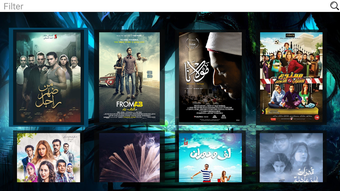
The user interface of AV-IPTV appears to be structured around simplicity and direct access to streaming content. Navigation is likely streamlined through a main menu with categorized channel lists, allowing users to browse and select streams with minimal steps. The workflow emphasizes quick access to live channels and on-demand media, reducing time between launch and playback.
While specific UI elements such as icons, color schemes, or layout details were not provided, the app’s design seems oriented toward functionality over visual flair. The performance of the application is expected to be consistent with typical Android streaming apps, particularly when using supported codecs. However, exact performance details such as CPU usage, RAM consumption, or frame rate stability were not specified.
The developer did not disclose resource usage metrics. Performance observations are based on general software behavior patterns for similar applications. Stability during extended use and background operation was not confirmed.
Users may experience variability depending on device hardware, network quality, and the source of the streams.
Compatibility & System Requirements
AV-IPTV is compatible with Android devices, as confirmed by the developer. The application is available in version 1.0.0 and has an installation size of 25.6 MB, indicating a lightweight footprint. The developer did not specify minimum Android OS versions, required hardware specifications, or processor compatibility.
It is assumed that the app functions on devices with standard Android capabilities, but exact compatibility details are limited. The application is distributed as an APK file, which means users may need to enable installation from unknown sources in their device settings. The developer did not provide information on support for tablets, wearables, or other Android-based platforms.
Compatibility with specific Android versions such as Android 8.0 or higher was not stated. The developer did not specify whether the app supports 64-bit architecture or requires specific GPU features. Exact system requirements were not listed.
Pros and Cons
Pros
- Free to download and use with no upfront cost.
- Supports multiple video quality levels including FULL-HD streaming.
- Uses modern video codecs (H264, H265) for efficient playback and reduced buffering.
- Channels are organized by category for easier navigation.
- Includes a customer support system available during business hours.
Cons
- Exact system requirements and compatibility details were not provided.
- Content sources and licensing were not disclosed.
- Performance under varying network conditions may vary without official optimization data.
- APK distribution requires users to enable installation from unknown sources.
- No information on update frequency or long-term maintenance plans.
FAQ Section
Is AV-IPTV available for iOS devices?
AV-IPTV is currently designed for Android devices only. There is no official version available for iOS.
Is the app safe to download and use?
AV-IPTV is distributed as a free APK. Users should ensure they download the file from trusted sources to minimize security risks. The developer did not provide a verified app signature or security certification.
How often does AV-IPTV receive updates?
The update frequency was not specified by the developer. Users should check the official source for the latest version.
Does AV-IPTV require a subscription or payment?
AV-IPTV is free to download and use. However, the availability of content may depend on third-party sources, which could have their own access policies.
Can I use AV-IPTV offline?
The application requires an active internet connection to stream content. It does not support offline playback or content caching.
Final Thoughts
AV-IPTV presents a compelling option for Android users seeking a free, lightweight streaming solution with support for high-quality video delivery. Its use of H264 and H265 codecs, combined with categorized channel organization, enhances usability and viewing stability. While the lack of detailed system requirements and content transparency limits full evaluation, the app’s core functionality aligns with the needs of casual viewers and mobile entertainment enthusiasts.
The inclusion of a support system adds value, especially for users encountering issues. However, users should exercise caution when downloading APKs and verify the source. For those looking for a straightforward, no-cost way to stream live TV, movies, and series on Android, AV-IPTV offers a functional and accessible platform.
Download AV IPTV APK now.





.png)

